
ROLAP Report Designer
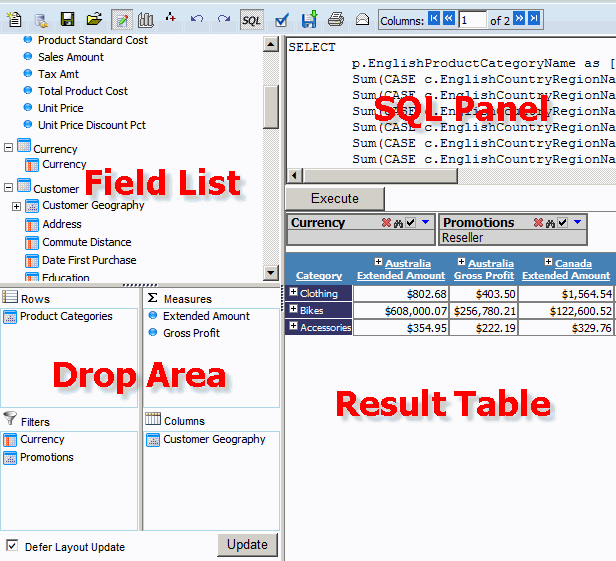
The ROLAP Report Designer has four main sections:
- Field List Panel - list measures, Dimensions, Properties and Hierarchies
- Drop Area Panel - is the drop destination for items from the Field List. It has four sections:
- Measures
- allows measures to be dropped
- Filters
- allows properties and hierarchies to be dropped for filtering
- Rows
- allows properties and hierarchies to be dropped on rows
- Columns
- allows properties and hierarchies to be dropped on columns
- SQL Panel
- Result Table Panel
Toolbar has the following buttons:
 New Report - resets the report
 Connect to Cube - opens connect to ROLAP cube dialog
 Save Report - opens save report dialog
 Open Report - opens /closes report tree panel with saved ROLAP reports
 Field List - opens / closes the Field List
 Chart - opens chart dialog
  Expand All / Drilldown - Switches between Expand All / Drilldown navigational modes
 Do / Undo
- allows the user to move back to the dilldown row and forth.
These buttons are visible in Drilldown navigational mode only.
Do / Undo
- allows the user to move back to the dilldown row and forth.
These buttons are visible in Drilldown navigational mode only. SQL - opens / closes the SQL panel
 Options - opens Options Dialog
 Export - Allows the report to be exported to: Excel, CSV, PDF and HTML formats
 Print - allows report printing
  Email - opens Email Report dialog