ROLAP Aggregations
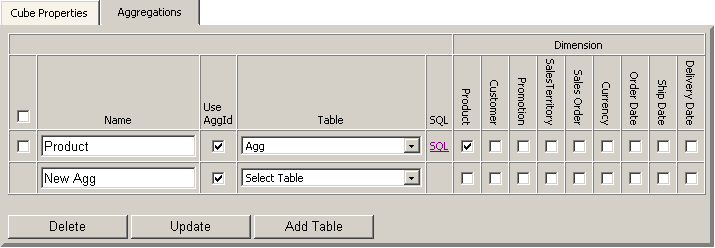
Aggregations setup page allows one to add an aggregation table,
populate the table with summary data and setup the cube to
use the aggregation.
ROLAP report will pick the aggregation with the lowest granularity possible.
-
To add an aggregation table click the "Add Table" button.
A dialog with table creation script will appear.
Update the script to change the table name, data types and indexes if needed.
-
To add an aggregation: update "New Agg" to another name,
select the table to store aggregate values, select the aggregation
granularity by selecting dimensions. Note that selecting many
dimensions will increase the amount of space used and decrease
the effectiveness of the aggregation.
-
To delete an aggregation select the checkbox left of the aggregation
and click Delete button.
-
Select the table from the dropdown for the aggregation.
To use a single table for multiple aggregations the table should
have AggId column of integer type. The column will store the
aggregation id for the aggregation itself.
The "Use AggId" option should be updated for the aggregation.
For performance reason a separate table should be used when
aggregation contains too much data.
-
Click the "SQL" link to create the script to
populate the table with summary data.
The script can be ran immediately or scheduled to run periodically.
For partitions that include time dimension it is recommended
that you process data only for the current day.