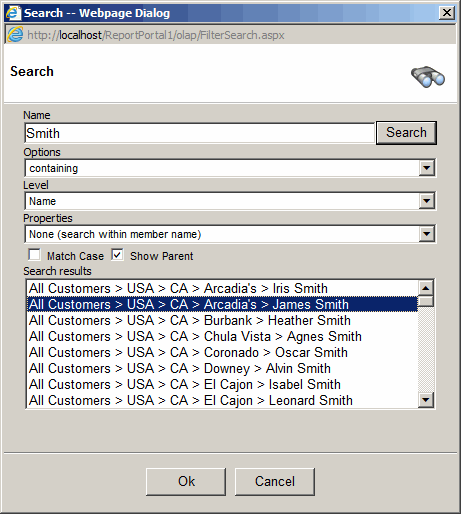
Filter Search
- Click the search icon on a dimension filter.
- Select one of the search options: Containing, Starting with, Ending with,
Exact match, Not Containing.
- Select the Level you would like to search. Select "Search All" to search the
entire dimension.
- Optionally, you can select a property to search for the selected level
- Uncheck "Show Parent" if you want to see member name only.
- Check "Match Case" to prefer a case sensitive search
- Click the "Search" button or press enter.
- If the search returned more than one hundred records you will be asked
if you would like to redefine your search criteria. Click cancel to view all results anyway.
- If the filter is in the multi-select mode you will be able to select more than more member.
- Click "Ok"