Freeform Dashboard
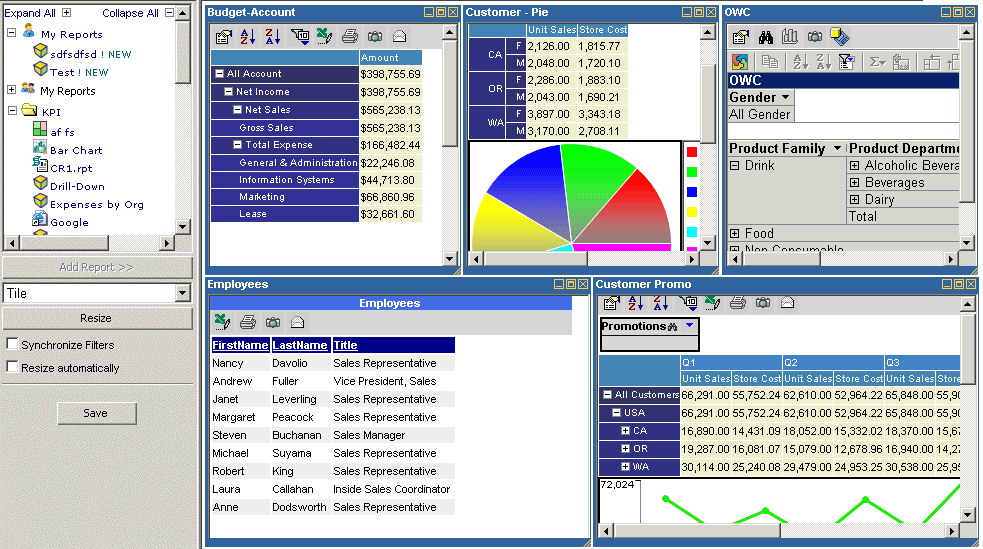
Freeform Dashboard report gives the ability to show multiple synchronized
reports on single page. Each sub-report can be positioned anywhere on the page.
- To build a Dashboard report, select a report you would
like and click the "Add Report" button. The maximum of 100 reports
can be selected.
- Each report resided within a window. Windows can be resized minimized,
maximized and closed. Dashboard report also gives the ability to
automatically resize windows by tiling, horizontally or vertically.
Select the Resize type and click the "Resize" button to automatically
resize windows.
- When the "Synchronize Filters" checkbox is checked OLAP and OWC
reports will synchronize filters when a filter selection made. For instance,
there are two OLAP reports that point to the "Sales" cube and have the
same "Customers" filter. When a selection is changed in the "Customers"
filter to "CA" in one of the reports the other report will also have
"Customers" filter selection changed to "CA".
- To save a a Dashboard report click the "Save" button.
- To open an existing Dashboard report, select a
Dashboard report