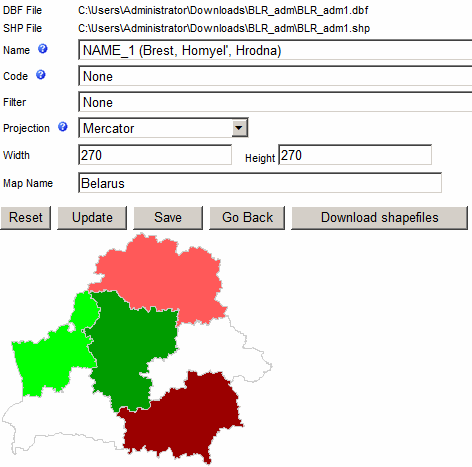
Importing ESRI shape files
You can import ESRI shape files to be used for map charts.
- DBF File - is the data file used by the ESRI shape file
- SHP File - is the ESRI shape file that has list of shapes needed to create the map chart
- Name - is used for grouping shapes into a single entity. For example, UK entity will
comprise four shapes (England, Northern Ireland, Scotland and Wales.)
- Code - is used as a shape label. This field is optional. It can also be
used as an alternative way to map data.
- Filter - can be used to restrict the number of shapes exported into the map chart.
For example, if you have a shape file of the entire world use can use the filter
to import only European countries.
- Projection - is a method of representing the surface of a sphere on a plane.
- "Reset" button will reset and remove uploaded files
- "Update" button will apply settings to selected chart
- "Save" button will save the map chart into the application database
- "Go Back" button will take you back to the Map Editor
- "Download shapefiles" button will show you a list of online resources where
you can get free map shape files