
Child Data Entry forms
Child Data Entry forms mode provides:
- Ability to link related data forms for an ease of navigation.
For example, by linking Orders form to an Employee form you can see all of the orders made by a given employee.
- Once established, the relationship will be visible in the data navigation tree and as a tab in the bottom of the data entry form.
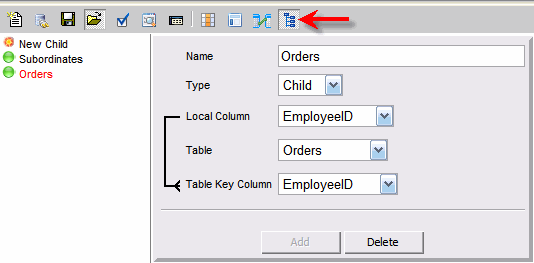
To create a new child relationship please:
- Enter the name of the relationship
- Select the type of relationship
- Child - many records exist for the for the current record
- Parent - only one record can be linked to the current record
- Select Local column that will be liked to the referenced table
- Select Data Form that is tied to the referenced table.
Note that related forms have to belong to the same connection
and it is only possible to link to an existing data form.
- Select Key Column for the referenced table