Report Options
- Toolbar options for the view mode:
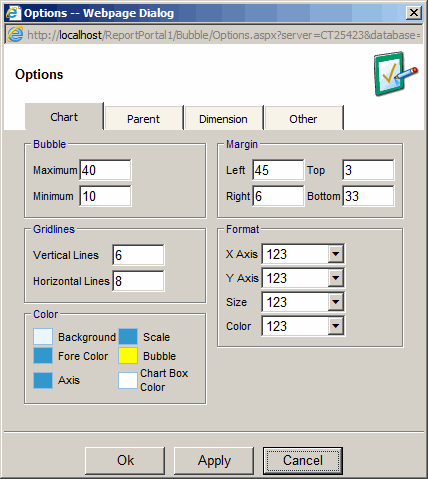
- Bubble
- Maximum - maximum size of the bubble in pixels
- Minimum - minimum size of the bubble in pixels
- Margin
- Left - left margin in pixels
- Right - right margin in pixels
- Top - top margin in pixels
- Bottom - bottom margin in pixels
- Gridlines
- Vertical Lines - number of vertical dividing lines
- Horizontal Lines - number of horizontal dividing lines
- Format
- X Axis - number of decimal places for X Axis line labels and mouse over label
- Y Axis - number of decimal places for Y Axis line labels and mouse over label
- Size - number of decimal places for mouse over label
- Color - number of decimal places for mouse over label.
This option is relevant only when "Based on Measure" option is selected.
- Color
- Background - color of the outer box
- Fore Color - color of the lines for the inner box and the scale
- Axis - color for axis measure labels
- Scale - color for X and Y Axis line labels
- Bubble - bubble color. This option is relevant only when "Same" option is selected.
- Chart Box Color - color of the inner box
Parent Options
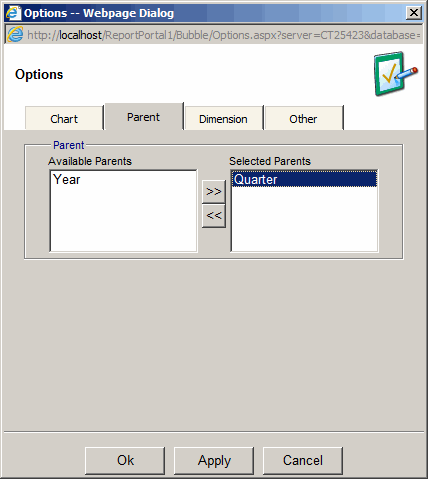
- Available Parents - levels above the Time Dimension level.
For example, if Time Dimension level is Date, the Available Parents might be: Year and Month.
- Selected Parents - selected parent will appear at the bottom of the scale.
Time Dimension level will appear at the top of the scale.
This way it is possible to see a year or a month for the related date.
Dimension Options
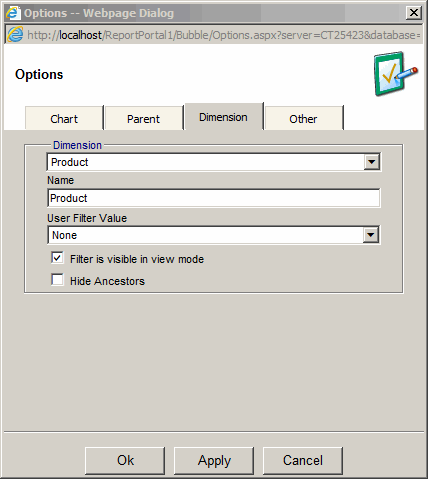
- Provides the ability to change name of a dimension
- Provides the ability to choose a user filter default value for a filter
- Provides the ability to hide the filter in the view mode
- Provides the ability to hide the parent of the selected filter value